



Zombie Arrow Strike Unity Source Code
$99.00
- Complete zombie-themed Unity arrow puzzle game.
- 563 included campaign levels.
- Strategic arrow movement and release mechanics.
- Straight and curved arrow paths.
- Color-matching zombie gameplay.
- Temporary arrow storage system.
- Level completion, failure, retry, and progression.
- Zombie characters, animations, and visual effects.
- Arrow styles and supporting customization assets.
- Google AdMob integration code, disabled by default.
- Optional Firebase and GameAnalytics configuration.
Description
Zombie Arrow Strike Unity Source Code features 563 campaign levels, full C# source code, game art, UI assets, and an integrated level editor.
Zombie Arrow Strike is a zombie-themed puzzle game combining strategic arrow movement with color-matching mechanics. Built with Unity 6.3 LTS, the project provides an editable development foundation for indie developers, mobile game studios, and creators who want to customize and extend a casual puzzle game.
Strategic Arrow Puzzle Gameplay
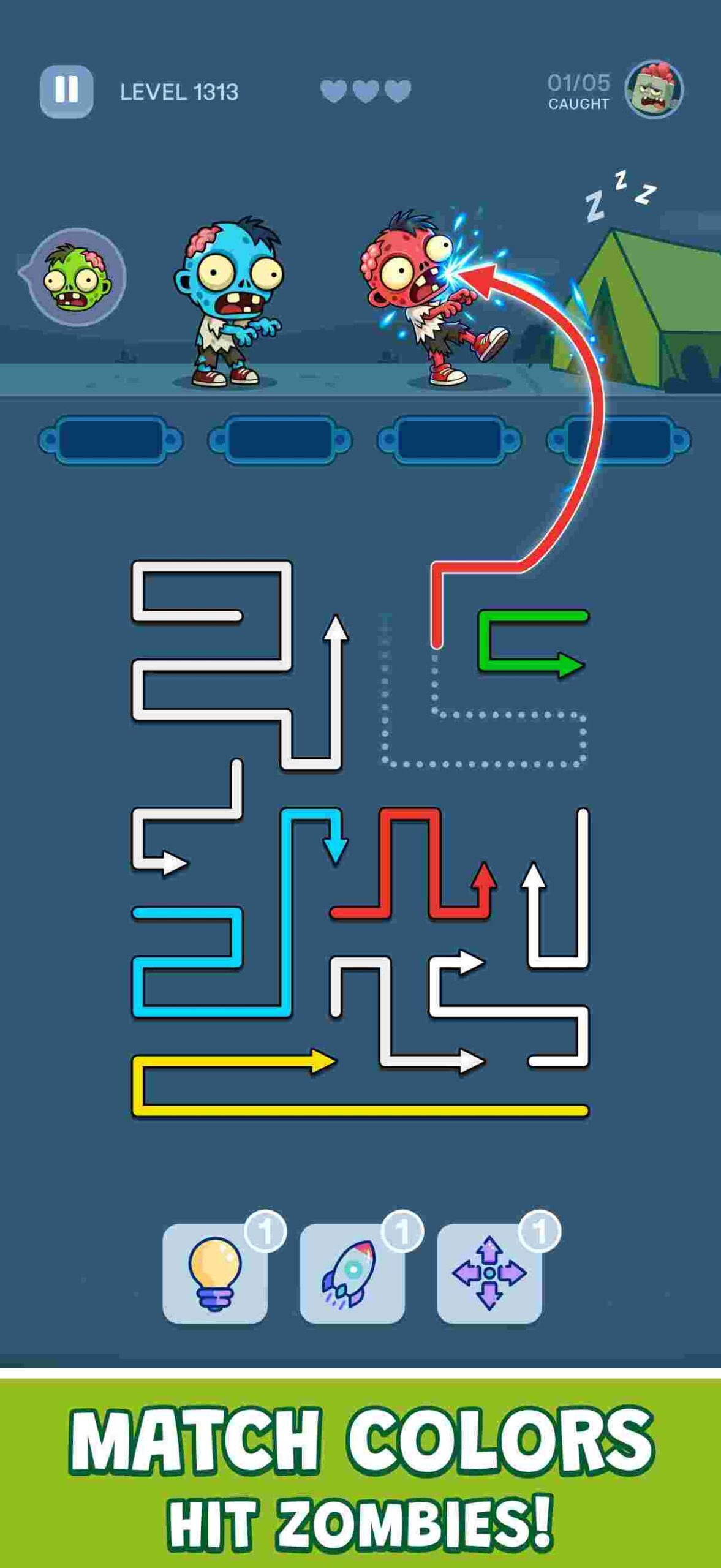
Players must select and release arrows in the correct order while responding to approaching zombies. Each puzzle combines arrow positioning, movement direction, color matching, and limited storage space. Players need to make strategic decisions to clear the board and complete the zombie encounters.
Gameplay includes:
- Straight and curved arrow paths.
- Color-matching zombie encounters.
- Strategic arrow-release mechanics.
- Temporary arrow storage.
- Puzzle deadlock and retry handling.
- Level progression and completion rewards.
- Increasingly varied puzzle configurations.
563 Campaign Levels Included
The Unity puzzle game template includes 563 campaign levels with different arrow arrangements, layouts, and color-matching challenges.
Level content is stored in editable Unity assets and managed through the included LevelCatalog system.
Developers can study the existing levels, customize them, and use the level-authoring workflow to create additional puzzle content.
Integrated Unity Level Editor
A major feature of Zombie Arrow Strike is its included level-creation system. The Unity Editor tool provides a workflow for designing and modifying supported puzzle levels, configuring arrow paths, working with zombie targets, validating level conditions, and saving new level assets. The package also includes SVG-related level-design resources and documentation explaining the supported vector-authoring workflow.
Complete Source Code and Game Assets
The package includes the complete Unity project with editable C# scripts, scenes, prefabs, ScriptableObjects, gameplay systems, animations, user-interface assets, sound effects, and other supplied visual resources.
Included game interfaces cover the main menu, gameplay HUD, settings, level completion, failure and retry, shop, zombie collection, and supporting popups.
This Unity game source code is structured for developers who want to customize the game while retaining its existing gameplay foundation.
Reskin and Customize Your Game
The included documentation explains how to personalize the project.
Customization topics include:
- Replacing the Android launcher icon.
- Changing the application name and package identifier.
- Replacing startup artwork and gameplay sprites.
- Changing UI colors, backgrounds, and button states.
- Editing TextMeshPro labels and interface text.
- Modifying text controlled by C# scripts.
- Customizing supported arrow and zombie artwork.
- Creating and importing additional level designs.
The reskin guide identifies relevant Unity scenes, prefabs, Inspector components, and source-code locations.
Google AdMob Integration
The project retains a Google AdMob-only advertising integration, including code for supported banner, interstitial, and rewarded-ad workflows.
Advertising is disabled by default. Buyers must configure their own AdMob App IDs and Ad Unit IDs and enable the documented integration settings before testing or publishing advertisements.
Optional Firebase and GameAnalytics components are also included for developers who wish to configure these services.
Complete Buyer Documentation
The download includes step-by-step documentation covering:
- Unity installation and project import.
- Initial configuration and basic gameplay.
- Android launcher icon replacement.
- UI color and text customization.
- Level editor and authoring workflow.
- AdMob and optional service configuration.
- Android build preparation.
- Troubleshooting and common questions.
Documentation is provided in readable PDF and Markdown formats, supported by annotated instructional images.
Technical Information
- Game engine: Unity 6.3 LTS
- Unity Editor: 6000.3.18f1
- Primary programming language: C#
- Game orientation: Portrait
- Included campaign: 563 levels
- Primary development target: Android
- Advertising architecture: Google AdMob
- Package format: Complete Unity project and source files in ZIP format
Important Information
This product is a customizable Unity development package, not an exclusive transfer of the original game’s ownership.
Buyers should review the included README, system requirements, third-party notices, and documentation before making modifications.
AdMob accounts, developer accounts, production credentials, application signing, customized publishing configuration, and app-store submission services are not included.
Use of the product is governed by the applicable Codester license and relevant third-party license terms.
For product-related questions, please use Codester’s item support system.
Requirements
Required Software
- Unity Editor 6000.3.18f1 (Unity 6.3 LTS).
- Unity Hub with a compatible development environment.
- Basic familiarity with the Unity Editor.
- C# programming knowledge recommended for modifying gameplay code.
Android Development
- Unity Android Build Support.
- Android SDK and NDK Tools.
- OpenJDK.
- Buyer-specific Android application identifier.
- Android signing configuration for production builds.
Project Configuration
- Keep the included Assets, Packages, ProjectSettings, and required LocalPackages directories together.
- Follow the included README and installation documentation.
- Review THIRD_PARTY_NOTICES.md for included dependencies and licensing conditions.
Optional Services
- Google AdMob account and buyer-owned App IDs and Ad Unit IDs, if enabling advertisements.
- Firebase account and project configuration, if enabling Firebase.
- GameAnalytics account and configuration, if enabling analytics.
- Developer-owned privacy-policy and terms-of-service URLs where required.
Compatibility Notes
The source code is prepared using Unity 6000.3.18f1 with Android as its primary development target.
Compatibility with other Unity versions, iOS, WebGL, and untested hardware configurations is not guaranteed. Buyers should test their customized build before publishing.
You must be logged in to post a review.


Reviews
There are no reviews yet.