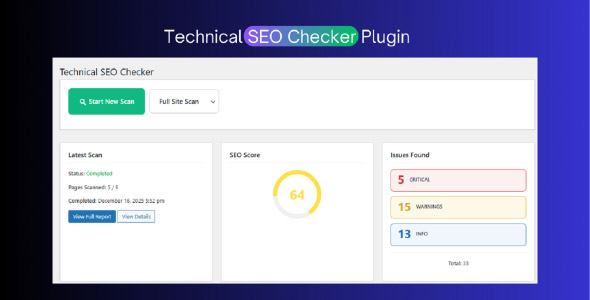
Technical SEO Audit WordPress Plugin performs in-depth technical SEO audits of your entire website. Analyze every page for SEO issues, performance problems, mobile-friendliness, security concerns, and more with a single click.
Key Features
- One-Click Full Site Audit – Scan your entire website with a single click
- 46+ Technical SEO Checks – Comprehensive analysis covering all aspects of technical SEO
- Page-wise Analysis – Detailed technical SEO analysis for each page
- SEO Health Score – Get a 0-100 SEO score for each page
- Issue Severity Levels – Critical, Warning, and Info level issues
- Category-based Organization – Issues organized by 9 major categories
- Exportable Reports – Export to CSV or PDF format
- Scheduled Automatic Scans – Set up automatic scans (daily, weekly, monthly)
- REST API – Developer-friendly REST API endpoints
- Multisite Compatible – Works with WordPress Multisite
- No External Dependencies – Works entirely on your server
Technical SEO Checks Performed
- Indexing & Crawlability: Noindex detection, robots.txt analyzer, sitemap validation, orphan pages, canonical tags
- URL & Structure: URL length, parameterized URLs, trailing slashes, duplicate URLs, pagination SEO
- Meta & On-Page: Meta titles, descriptions, H1-H6 structure, heading validation
- Internal Linking: Link counts, broken links, nofollow links, anchor text distribution
- Performance: Render-blocking resources, large images, image optimization, minification
- Mobile & UX: Mobile-friendly test, viewport configuration, font sizes, CLS risks
- Schema Markup: Schema presence, invalid schema detection, article/breadcrumb validation
- Security: HTTPS status, mixed content detection, security headers
- Redirects: 404 errors, soft 404s, redirect chains, redirect loops
How It Works
- Click “Start New Scan” from the dashboard
- The plugin crawls your website starting from the homepage
- Each page is analyzed for technical SEO issues
- Results are stored in the database with detailed reports
- View comprehensive reports and export to CSV/PDF
WordPress SEO Plugin Features
– One-click full site technical SEO audit
– 46+ comprehensive technical SEO checks
– Page-wise detailed analysis
– SEO Health Score (0-100) for each page
– Issue severity levels (Critical, Warning, Info)
– 9 category-based issue organization
– Exportable reports (CSV and PDF)
– Scheduled automatic scans (daily, weekly, monthly)
– REST API endpoints for developers
– WordPress Multisite compatible
– No external API dependencies required
– Modern, responsive admin interface
– Real-time scan progress tracking
– Comprehensive documentation included
Requirements
– WordPress 5.8 or higher
– PHP 7.4 or higher (PHP 8.0+ recommended)
– MySQL 5.6 or higher
– Memory Limit: 128MB minimum (256MB recommended)
– Max Execution Time: 300 seconds (for large sites)
Instructions
1. Download the WordPress SEO Plugin zip file
2. Log in to your WordPress admin panel
3. Navigate to Plugins > Add New
4. Click “Upload Plugin”
5. Choose the downloaded zip file
6. Click “Install Now”
7. After installation, click “Activate Plugin”
8. Go to “SEO Checker” in the WordPress admin menu
9. Click “Start New Scan” to begin your first technical SEO audit
10. View detailed reports and export to CSV/PDF as needed