Cookie Consent Lite GDPR Compliant WordPress Plugin helps your website stay compliant with GDPR and CCPA regulations. It offers a fully customizable cookie banner, consent by category (Essential, Analytics, Marketing, Preferences), and a modern, responsive design that works on all devices.
What sets this plugin apart is its built-in cache-busting technology, which ensures the banner displays correctly even when using caching plugins like WP Rocket, W3 Total Cache, LiteSpeed, or CDNs like Cloudflare. It’s designed to work out of the box with minimal setup and no coding required.
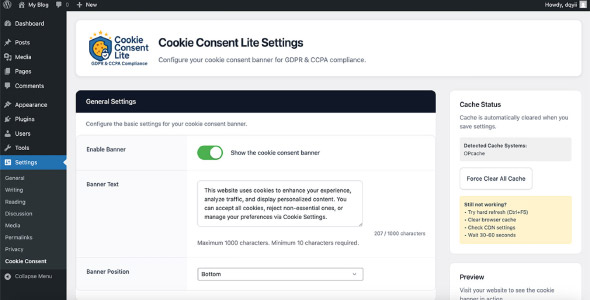
The admin interface is clean and easy to use, offering real-time previews, toggle switches, color customization, button controls, and full text editing. You can set cookie expiration periods, enable/disable categories, and control how consent is displayed and stored.
For developers, it includes helpful features like hooks, filters, JavaScript APIs, and PHP functions to load scripts based on user consent. This makes it easy to integrate advanced tracking or marketing tools while remaining compliant.
WordPress GDPR Plugin Features
- GDPR & CCPA compliant
- Lightweight and fast performance
- Fully responsive and mobile-friendly
- Works with all major caching plugins and CDNs
- Cache-busting technology for reliable banner display
- Customizable banner colors, text, and layout
- Top or bottom banner placement
- Cookie categories: Essential, Analytics, Marketing, Preferences
- Consent modal with user-controlled preferences
- Real-time preview and easy admin interface
- Accept All, Reject, and Settings buttons
- Set custom cookie expiration times
- JavaScript API and PHP functions for developers
- Hooks and filters for advanced customization
- Debug and reset mode for testing
- No personal data collection
- Easy to install and configure – works out of the box
Requirements
- WordPress version 5.0 or higher
- PHP version 7.4 or higher
- Compatible with all major caching plugins (WP Rocket, W3 Total Cache, etc.)
- Works with most modern themes and page builders
- No external dependencies required
Instructions
- Download the plugin ZIP file from your Codester account.
- Log in to your WordPress admin dashboard.
- Navigate to Plugins → Add New → Upload Plugin.
- Upload the ZIP file and click Install Now.
- Once installed, click Activate Plugin.
- Go to Settings → Cookie Consent Lite to configure your banner and preferences.