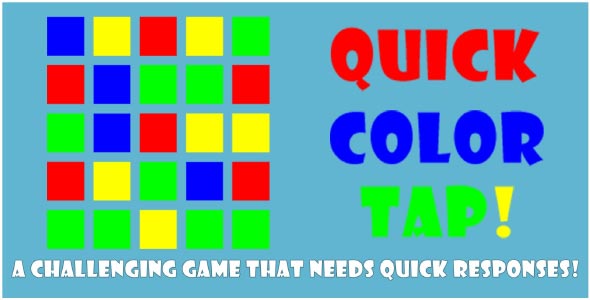
Quick Color Tap – Unity Game Source Code is a fast-paced and highly challenging reflex game designed for developers who are looking for clean, reusable source code and a ready-to-customize gameplay concept. Built around simplicity and speed, this project demonstrates how a minimal idea can turn into an engaging experience. Players are presented with a 4×4 grid of 16 colored squares using four main colors: red, blue, green, and yellow. With a single tap, the game begins, and the challenge unfolds instantly.
At the start of each round, the background flashes rapidly with one of the four colors. The player must quickly tap a square that matches the flashing color to remove it. One wrong choice ends the game immediately. The goal is to clear all squares as fast as possible and achieve the best possible record time. This concept makes the project ideal for learning timing, input handling, and color-based logic in Unity.
Unity Template for fast-paced color games
This project can be easily reused as a Unity template for developers who want to create reaction-based or memory-focused games. The mechanics are straightforward but highly effective, making the template suitable for beginners and intermediate developers alike. The code structure is clean and modular, allowing you to understand how the grid system, color selection, and win/lose conditions are handled.
Because the gameplay relies on rapid visual feedback, this template is perfect for experimenting with UI elements, animations, and timing systems. You can quickly modify the number of colors, grid size, or blinking speed to increase or decrease difficulty. As a source-code-focused asset, it allows developers to learn by reading, modifying, and extending the logic rather than working with locked or compiled components.
This Unity template is also ideal for publishing on mobile platforms. With minimal optimization, it can run smoothly on both Android and iOS devices, making it a solid foundation for commercial or educational projects.
Unity Project structure and source code flexibility
The Unity project is organized with clarity in mind, which is essential for developers browsing or purchasing source code. Scripts are separated by responsibility, such as game management, input detection, color matching, and UI updates. This makes the project easy to navigate and customize without wasting time understanding complex dependencies.
From a learning perspective, this Unity project demonstrates how to manage game states like start, active gameplay, win, and game over. It also shows how to track time accurately to calculate the player’s final score. Developers can extend the project by adding features such as leaderboards, sound effects, difficulty levels, or visual themes.
Since the website focuses on source code, this project fits perfectly as a practical example of how to build a complete game loop using Unity. Whether you want to reuse it as a base or dissect it for educational purposes, the flexibility of the source code makes it a valuable asset.
Unity Game designed for speed and precision
As a Unity game, Quick Color Tap focuses on pure skill, speed, and precision. There are no complex rules to learn, which keeps players engaged from the first second. The increasing tension created by rapid color blinking challenges reflexes and concentration, making each round exciting and competitive.
From a developer’s standpoint, this Unity game highlights how minimal design can still deliver strong player engagement. It is an excellent example of how to balance simplicity with challenge. The concept is also highly adaptable—you can turn it into a multiplayer challenge, add power-ups, or introduce penalties for slow reactions.
Overall, Quick Color Tap is an excellent source-code-driven Unity game that demonstrates clean programming, engaging mechanics, and strong replay value. It is a great choice for developers seeking a ready-to-use project or a solid foundation for their next Unity-based idea.
Features
- Cross Platform (Android, iOS, Windows)
- High Definition Graphics
- Fully Integrated Sounds
- Document included
- Made in unity engine
Requirements
- Unity 5.4 or 2018.4.11 or higher version
Instructions
- Install unity 5.4 or unity 2018.4.11 or higher version to load up the project and see the read me file for details about editing, reskinning and etc.