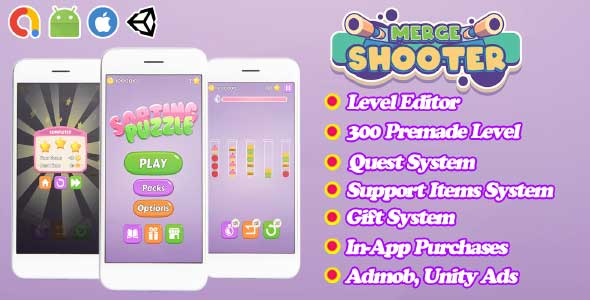
Sorting Puzzle – Unity Source Code provides developers with a complete, reskinnable, and highly polished puzzle game foundation. Designed around the popular tube-sorting mechanic, this Unity project challenges players to sort adorable food items—like burgers, fries, donuts, and cupcakes—into the correct tubes. With its smooth UI, intuitive controls, and addictive gameplay loops, this Unity game is an excellent choice for developers looking to launch a casual mobile title quickly. Since the website is focused on source code, this project stands out as a ready-to-build puzzle system that can be customized, monetized, and published with minimal effort.
Designed specifically for developers who value clean and organized code, this Unity source code package offers a flexible structure that allows creators to modify game assets, add new levels, and adjust the difficulty flow. Whether you’re developing your first Unity project or expanding your catalog of casual puzzle games, this package provides a strong foundation to build on.
Why This Unity Project Is Perfect for Casual Puzzle Game Development
This Unity project is crafted to help developers produce a fully functional and visually appealing Unity game without starting from scratch. At its core, the gameplay revolves around sorting matching food items into the correct tubes—a mechanic proven to be both simple and highly addictive. Players enjoy relaxing challenges while developers benefit from a stable and expandable base.
The Sorting Puzzle – Unity Source Code is structured so that nearly every asset can be swapped out easily. Want to replace the food items with animals, emojis, gems, or themed icons? Simply change the sprites and adjust the color palettes. The game logic remains intact thanks to clean, modular scripts that separate gameplay mechanics from visual assets. This makes it ideal for reskinning, rapid prototyping, or producing multiple variations for different audiences.
Additionally, the Unity project is optimized for mobile performance, ensuring smooth gameplay even on low-end devices. Touch controls are responsive, animations are fluid, and transitions are carefully designed to enhance user engagement. Since casual puzzle games rely heavily on polished interactions, this Unity game provides a reliable foundation that developers can trust.
Key Features Included in the Sorting Puzzle Unity Game Package
One of the standout strengths of this Unity source code package is its comprehensive feature set. It includes everything required to create a rewarding and highly engaging puzzle experience right out of the box.
The game includes undo and restart functions, giving players added control and improving replay value. Power-ups are also integrated, offering helpful boosts that can be used when players get stuck. These mechanics not only enhance gameplay but also provide opportunities for monetization through rewarded ads or in-app purchases.
The user interface is clean, modern, and optimized for mobile screens. Buttons, menus, and interactions feel intuitive, allowing players of all ages to enjoy the game comfortably. With AdMob integration already included, developers can monetize the Unity game instantly without complicated setup or third-party tools.
The codebase is neatly organized, enabling developers to modify levels, adjust difficulty, or add new mechanics with minimal effort. Because everything is built with scalability in mind, expanding the puzzle system or creating themed events becomes simple. This makes the Unity project ideal for long-term development or iterative updates after launch.
Conclusion
Sorting Puzzle – Unity Source Code is a complete, flexible, and fully reskinnable Unity project designed for developers who want to create a successful casual puzzle game quickly. Its relaxing food-sorting gameplay, organized code structure, mobile optimization, and built-in monetization options make it an excellent starting point for both beginners and experienced developers. Whether you’re launching a commercial Unity game or building a personal project to sharpen your skills, this source code package provides everything you need to customize, publish, and grow a fun and engaging puzzle experience.
Features
- Level Editor – Create Levels easily and quickly with the built-in editor.
- 3 Packs premade.
- 300 Attractive Levels premade.
- Easily create quests for players.
- Support Items System.
- Gift System to receive rewards and motivate players.
- Install and customize ads easily and quickly.
- In-app purchase System.
- Mobile Optimized
- PC, Android, and IOS support to build.
Requirements
- Unity 2022
Instructions
Easy to Reskin:
- Import the package into Unity.
- Change the UI, text, and logo with just a few clicks—it’s very easy with the visual editor tool integrated into Unity.
- Enter your AdMob Banner, Interstitial, and Rewarded Video IDs.
- Export a signed APK.
- Upload to the Google Play Store and other app stores.
- Earn money from ads.
- Detailed documentation and reskinning software included.
Documentation Includes:
- How to install, import the package into Unity, and build the APK file.
- How to change AdMob IDs.
- How to configure and change game elements (levels, characters, bonuses, speed, etc.)—very detailed and clear.
Regular License Features:
- Ready to publish.
- Assistance with integrating other ad services, if needed.
- FREE updates when a new version is available.
Extended License Features:
- Full reskin support, optimization guidance, and publishing assistance for Google Play.
- Bonus: A free Unity game.
- Lifetime support.
We provide unwatermarked images because we trust you will use your best judgment to create a legitimate reskin that adds value to the game. Please be mindful of Google’s policies against “spamming” the app store and take your time to design graphics that will delight users.